

Adding a Mob to the Mob Book in the WoolClip App
Use the Mob Book in the WoolClip app to create mobs before allocating bales. A mob must be added first so wool can be correctly linked to Mob.
How to Add a Mob to the Mob Book in the WoolClip App
Use the Mob Book in the WoolClip app to create mobs before allocating bales. A mob must be added first so wool can be correctly linked to Mob.
Step 1: Open the WoolClip app (online or offline)
Step 2: In the selected Job Tap the Mob Book will be green
Step 3: Tap the blue Plus button
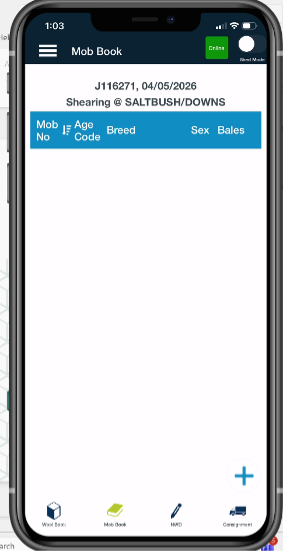
To add a mob, tap blue Plus
Step 4: Enter the mob details. This is the same mob information used in the WoolClip web view.
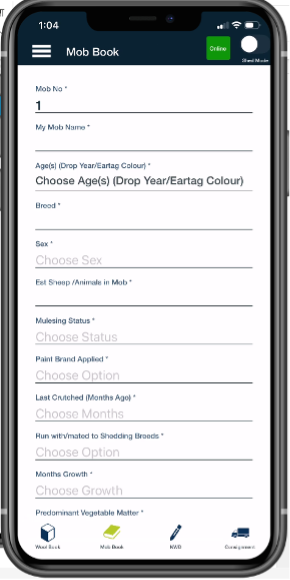
Mandatory information shown with *
Step 5: Review the details to make sure the mob is correct
Step 6: Save the mob
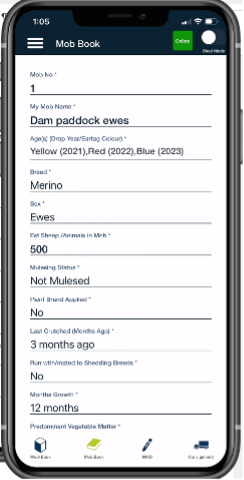
Saved information will show on the web and NWD section of the specification when declared
Step 7: Once saved, the mob will appear in the mob list and can be selected when allocating bales.
Notes
- If mobs have already been set up in WoolClip web, they will appear in the mob list in the app
- Mobs can be added in the app progressively as they are presented for shearing
- Reminder: A mob must be created before a bale can be allocated
Next steps
When you are comfortable with this workflow, explore related guides, watch WoolClip how-to videos, or contact AWEX WoolClip support if you need help.
Still need help?
Get in touch with our support team and we'll walk you through it.