

How to Add Mobs in the Web
Use this guide to add mob details to the Mob Book in the web
Step by Step to adding mobs: the Wool Classer or Wool Grower with an account
A Mob entry must be created before any bales containing wool from that mob can be entered in the Wool Book. The Mob Book details form the basis of the NWD section of the Specification.
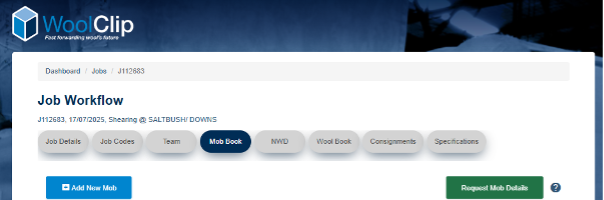
Step 1: Go to the Mobs module within the Job
Step 2: Select Add New Mob
Step 3: Open the Mob details section and enter the Mob name or description so the mob can be clearly identified
Step 4: Complete the mob details, including breed, age, sex, mulesing status, contact with shedding breeds response, and all other mandatory fields
Step 5: Enter the number of sheep in the mob if known. If the final number is not known yet, add the best available details and update the number later.
Step 6: Add or update any additional mob information, such as VM type, wool length, or other relevant details
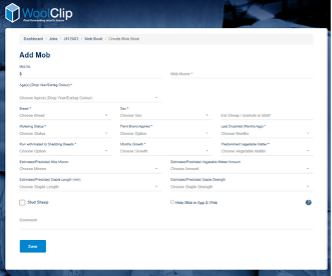
Step 7: Review the information carefully and make the Owner/Manager aware of the declaration responses so they can edit as required
Step 8: Select Save
Request Mob Details
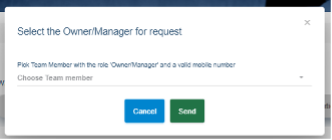
Use this feature if the Wool Classer doesn’t know the mob information and wants to set up the mob book in the web for a Job before shearing starts. A request can be sent to the Owner/Manager in the Team to log in and add the mobs and declare the NWD.
Helpful tips:
- Wool Growers with a farm account can start the Job and add mobs saving the Wool Classer adding information they may not yet know
- Mobs can be added weeks before shearing starts or progressively during shearing
- The order of mobs in the Mob Book does not need to match the order of shearing
- Additional mob information is used by the Marketing organisation to review compatible mobs for line building and is printed on the specification NWD section
- Mobs can be added in either the web or the app
Next steps
When you are comfortable with this workflow, explore related guides, watch WoolClip how-to videos, or contact AWEX WoolClip support if you need help.
Still need help?
Get in touch with our support team and we'll walk you through it.