

How to Send an NWD Declaration Request
This guide explains how to send a National Wool Declaration (NWD) request to the Owner/Manager so the declaration can be completed before the specification is finalised
Step-by-step instruction to send the declaration request for mobs in the mob book
- The Owner/Manager details must be recorded in the Team module
- For Wool Growers with a farm account, it is recommended add mob details and declare the NWD before shearing starts
Step 1: Select the NWD

Step 2: Answer the two property declaration questions with best known responses. Remember the Owner/manager will be checking all information and edit before declaring.

Step 3: Send the declaration request to the Owner/Manager.

The declaration status will change from Yet to Send to Requested. Once declared the status for each mob will show as Declared and dated.
Step 4: The system sends an email and/or SMS to the Owner/Manager using the details recorded in the Team module
Step 5: Ask the Owner/Manager to check details of each mob and edit them as required. At this stage only the owner/manager can edit the declaration mob details.
Step 6: The Owner/Manager agrees to the NWD program, enters their name, and completes the declaration from the email or SMS link
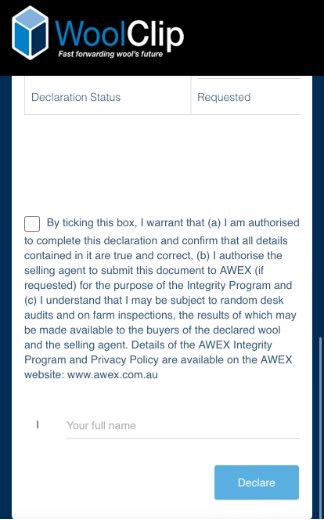
Step 7: If any mobs are added after the initial declaration, ensure the newly added mobs are also declared by resending the request
Step 8: Confirm that all mobs are declared before finalising any specification that contains bales from those mobs
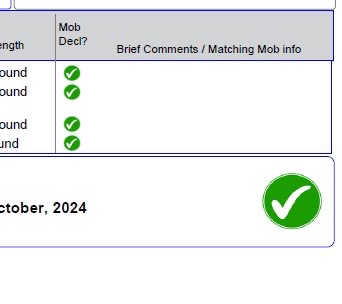
Step 9: Check the specification to confirm declared mobs are identified by a green tick
Important reminders:
- The NWD declaration must be completed by the Owner/Manager before the specification is finalised
- Declaring the NWD before shearing starts can save time and reduce the risk of missed declarations for bales heading to sale
- Every mob included in a specification must be declared
Next steps
When you are comfortable with this workflow, explore related guides, watch WoolClip how-to videos, or contact AWEX WoolClip support if you need help.
Still need help?
Get in touch with our support team and we'll walk you through it.