

A Quick Guide to Sending a Consignment in the Web
This guide gives an overview of when to use the consignment module
How to send a Consignment in WoolClip (Web)
A consignment note is used to notify the marketing organisation’s destination warehouse that bales are being delivered. Sending a consignment is optional, but it can help improve logistics planning and delivery tracking.
Step 1: Select Add New Consignment
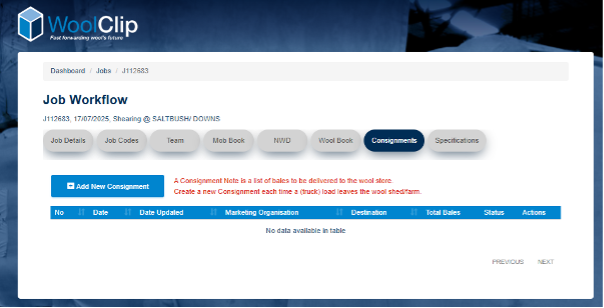
Step 2: Tick the bales that are being consigned
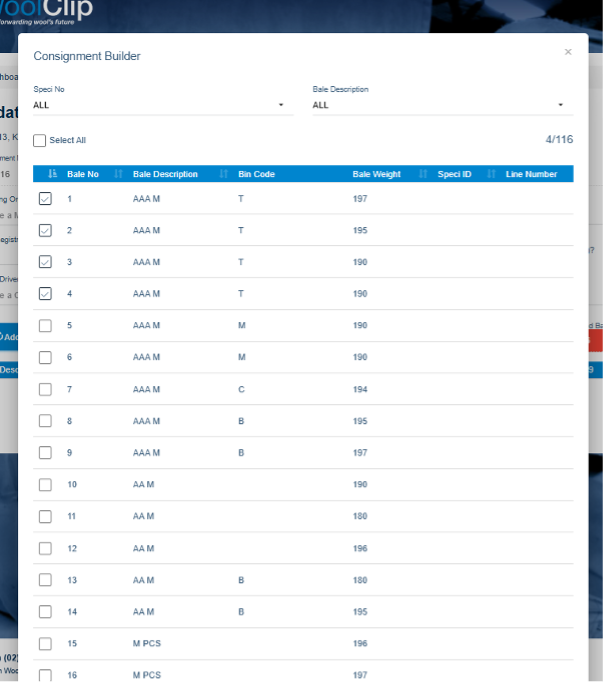
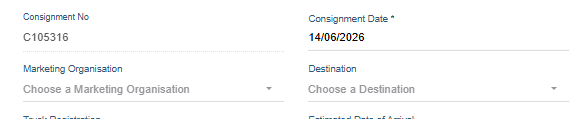
Step 3: Select the relevant Marketing Organisation and Destination from the menu
Step 4: Complete the required consignment details. Include the carrier details.
Step 5: Review the information to make sure it is correct. Only include bales that are on the truck/load
Step 6: Select Send to submit the consignment
Note: the consignment is a delivery record of bales leaving the farm. It is not a list of bales ready for lotting. That is the function of the Wool Classer specification.
Tip: Before sending, confirm the bale selection, marketing organisation, and destination warehouse are correct.
Next steps
When you are comfortable with this workflow, explore related guides, watch WoolClip how-to videos, or contact AWEX WoolClip support if you need help.
Still need help?
Get in touch with our support team and we'll walk you through it.