

Setting Up a Farm Account and Wool-ID
This guide is for Wool Growers who want to set up a Farm Account and generate a Wool-ID
How to set up a WoolClip Farm Account and Wool-ID
A Farm Account gives the Wool Grower access to all WoolClip functions including Jobs, Mobs, National Wool Declarations, Wool Books, Specifications and clip records.
Step 1: Create or Login to your WoolClip User Account
- Read the Getting Started panels.
- On the final panel, select I am a Wool Grower
This will take you to the Farm Account module
- Have the following details ready before creating the Farm Account:
- Trading name or business/entity name
- Farm location details
- Property Identification Code/s (PIC)
- Farm (Wool) brand details, correctly formatted according to brand conventions
- Broker client ID, if known
Step 2: Create the Farm Account
- From the WoolClip dashboard, select Create Farm Account
- Select My Account Details
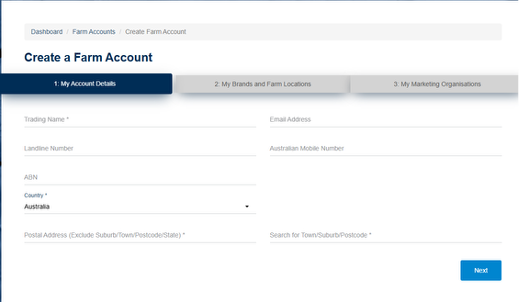
- Enter the trading name or business/entity name exactly as it should appear on the Wool Classer specification. Click Next
- My Brands and Farm Locations, select Add Farm Location
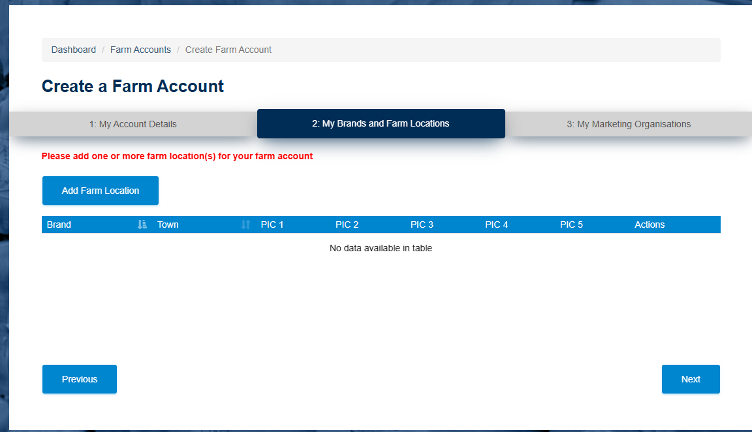
- Add the Brand. Make sure it follows the correct brand convention, including any under, over or other brand formatting requirements
- Add the farm location details
- Add the PIC, Save and Next
- Nominate the marketing organisation or broker that will verify the Farm Account
- Add the broker client ID, if known
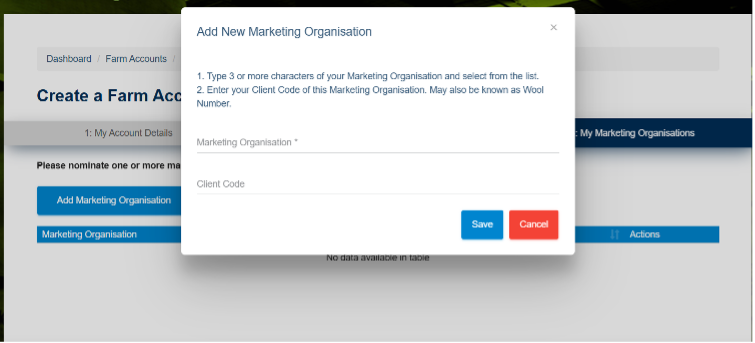
- Submit the Farm Account for verification
Step 3: Wait for verification
The nominated marketing organisation verifies the Farm Account. Allow up to one business day for verification. Once verified, WoolClip generates a unique six-character Wool-ID for the Farm Account. The Wool-ID is sent to the wool grower by email or SMS and is also visible on the WoolClip dashboard.
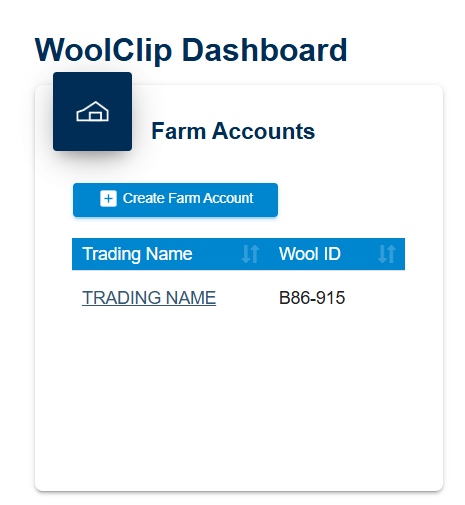
You may have more than one trading entities: Create additional farm accounts and Wool-IDs for other trading accounts you manage or add any additional farm locations, PICs and Brands under the Farm account.
Next steps
When you are comfortable with this workflow, explore related guides, watch WoolClip how-to videos, or contact AWEX WoolClip support if you need help.
Still need help?
Get in touch with our support team and we'll walk you through it.