

Step-by-Step: Installing the WoolClip APP
Make sure you have the latest version of the WoolClip app. Only the latest version of the app will sync correctly with the WoolClip web page. Please check that you are using version 3.41 on Apple devices or version 3.44 on Android devices. NOTE: You may have the latest version (3.41 or 3.44) but the...
Make sure you have the latest version of the WoolClip app. Only the latest version of the app will sync correctly with the WoolClip web page.
Please check that you are using version 3.41 on Apple devices or version 3.44 on Android devices. NOTE: You may have the latest version (3.41 or 3.44) but the background function will not work unless the below steps were carried out.
What you need to do
Please completely delete the existing WoolClip app from your device, then reinstall it from the App Store or Google Play. NOTE Removing the icon from the Home Screen alone will not delete the app.
For Android users
Before deleting the app, clear its stored data:
- Open Settings and select Apps.
- Select WoolClip, then Storage.
- Select Clear data or Clear storage.
- Uninstall WoolClip, then reinstall it from Google Play.
- Allow camera and location access
For Apple users
1.Select Delete App and its data.
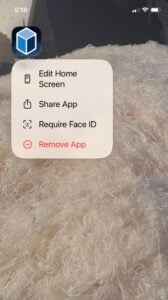
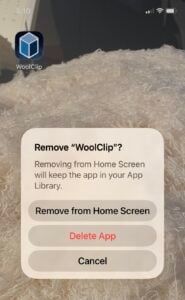
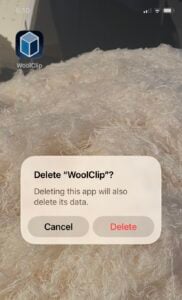
2.Go to the App Store and GET App.
3.Allow camera and location access
When you log in
Please type your username and password in full using the keypad. For the first login, do not use autofill and facial recognition.
The app may take a little longer to load the first time it opens.
Why this matters: Older versions will not sync with WoolClip on the web. Information recorded in an older version, including bale details, could be lost if it has not synced.
Keeping the app running smoothly
If the app has been running slowly, log in to WoolClip on the web and close any completed jobs in the job list using the new app access function. This can help improve performance.
We’re happy to help make this update as easy as possible. If you have any questions or would like assistance, please contact WoolClip Support on (02) 9428 6170 or at woolclip@awex.com.au.
Still need help?
Get in touch with our support team and we'll walk you through it.