

Get Ready for Shearing in 4 Easy Steps
A step-by-step guide for Wool Growers with a Farm Account to set up WoolClip before shearing starts
A step-by-step guide for Wool Growers with a Farm Account to set up WoolClip before shearing starts
Completing these steps early before shearing starts saves time in the shed, helps the Wool Classer access the Job, and supports accurate National Wool Declaration information.
What do I need to set up in WoolClip before shearing?
Step 1: Start the Job
Think of the Job as the digital wool book for the shearing. The Job should be created before shearing starts. Property, team, mob and declaration details can be added or updated.
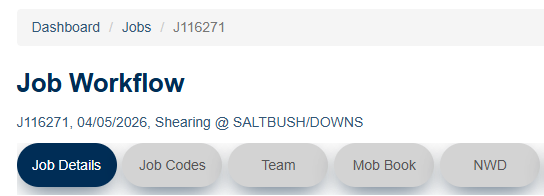
- From the WoolClip website dashboard, select Create New Job.

- Add the Wool-ID to populate the brand, PIC and farm location
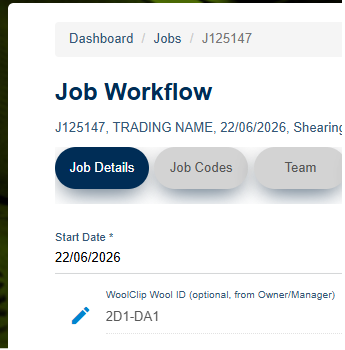
- Complete all mandatory fields and select any applicable quality scheme before saving the Job
Step 2: Add Team members

- If you have added the Wool-ID and have a Farm Account, you will be in the Team as the Job Administrator and Owner/Manager
- Add other team members as required. Eg Wool Classer and Marketing Representative
Step 3: Add Mobs
Mobs can be added weeks before shearing starts or progressively during shearing if details change. A mob must be added before any bale containing wool from that mob can be entered in the wool book. From the Mob Book Module:

- Select Add New Mob
- Complete all mandatory fields and save the mob/s
Step 4: Complete the NWD
It is recommended that the Owner/Manager completes the National Wool Declaration before shearing starts. This helps avoid missed declarations and supports accurate information for wool offered for sale. From the NWD module:
- Answer property declaration questions
- Check mob details carefully and declare
Next steps
When you are comfortable with this workflow, explore related guides, watch WoolClip how-to videos, or contact AWEX WoolClip support if you need help.
Still need help?
Get in touch with our support team and we'll walk you through it.