

App Access: Improved Responsiveness and Performance of WooClip App
App Access setting gives WoolClip users control over data downloads
New Feature: App Access Setting That Improves the Responsiveness and Performance of WoolClip App
This feature is for Users with large numbers of Jobs or have Jobs with large numbers of bales. Users can now control the quantity of data downloaded to their App with the job setting called: “App Access”.
- This setting allows each User to control the job/bale details downloaded to their WoolClip app
- The setting is user specific, so User 1 on a Job may wish to download all bales (ALL), whereas User 2 may wish to download no bales (NONE)
Tip: Keep your WoolClip app function quick and responsive by routinely setting jobs to None when they are finished. If you want a job to show on the App simply change the setting to All.
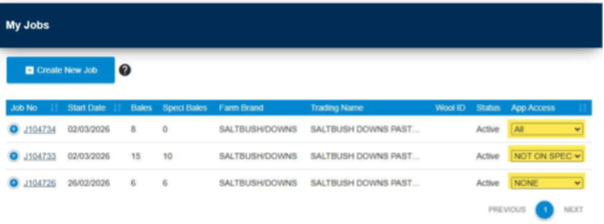
App Access Settings
- All = the Job and all bales will show in the WoolClip app
- Not on Speci = the job and and only bales not on a speci will show in the WoolClip app
- None = The Job will not show in the WoolClip app
Still need help?
Get in touch with our support team and we'll walk you through it.