

New Feature for Adding Stencil Numbers on Bales
Job Administrators can now fix all missing stencil numbers at once
Fix Missing Stencil Numbers on Bales in WoolClip
There are two circumstances when bales are added to the Wool Book and may not have a Stencil Number automatically added:
- When a Wool Classer has yet to be added to the Team, or
- When there are more than one Wool Classers in the Team and the Stencil has not been selected when adding a bale
This can be identified as bales/lines on the specification showing as D Cert.
If this occurs, a Stencil can be updated to bales in two ways:
- Open the bale(s) in the Wool Book and select the Stencil Number, or
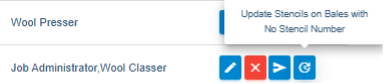
- Use the new global update feature from the Team
This feature allows a Job Administrator to update all bales with a missing Stencil by clicking on the icon next to the Wool Classer. The global update icon will only appear if one or more bales in the Job exist without a Stencil. Please note that in some cases bales are intentionally set as No Stencil by the Wool Classer.
Still need help?
Get in touch with our support team and we'll walk you through it.